Usage
Input
adata: AnnData object of shape
n_obs×n_vars. Rows correspond to cells and columns to genes.mode: Mode for identifying spatially variable genes. By default, mode=’moran_geary’.
n_top_genes: Number of spatially variable genes to keep. By default, n_top_genes=2000.
Output
adata: AnnData object with identified spatially variable genes and additional fields.
SINFONIA can also be seamlessly integrated with SCANPY, a widely-used Python library for single-cell data analysis:
import scanpy as sc
import sinfonia
# Load the spatial transcriptomic data as an AnnData object (adata)
# Normalize and logarithmize if the data contains raw counts
sc.pp.normalize_total(adata)
sc.pp.log1p(adata)
# Run SINFONIA
adata = sinfonia.spatially_variable_genes(adata)
AnnData
SINFONIA supports scanpy and anndata, which provides the AnnData class.
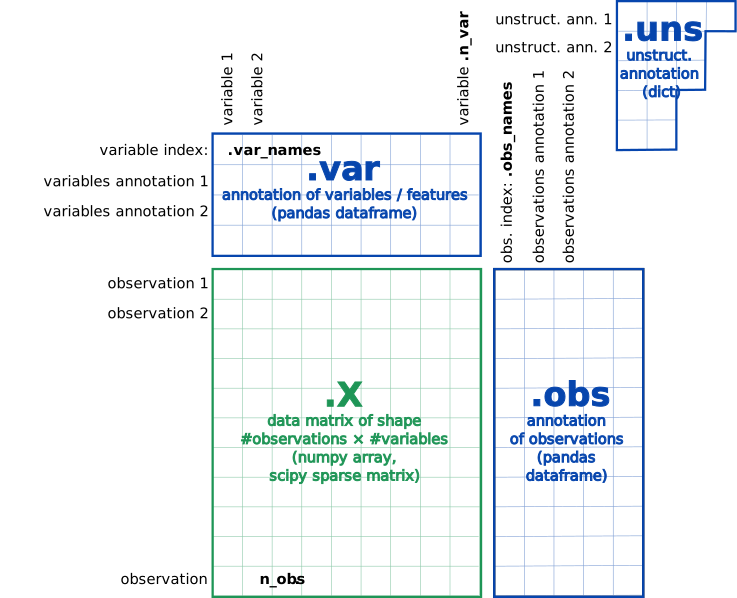
At the most basic level, an AnnData object adata stores
a data matrix adata.X, annotation of observations
adata.obs and variables adata.var as pd.DataFrame and unstructured
annotation adata.uns as dict. Names of observations and
variables can be accessed via adata.obs_names and adata.var_names,
respectively. AnnData objects can be sliced like
dataframes, for example, adata_subset = adata[:, list_of_gene_names].
For more, see this blog post.
To read a data file to an AnnData object, call:
import scanpy as sc
adata = sc.read(filename)
to initialize an AnnData object. Possibly add further annotation using, e.g., pd.read_csv:
import pandas as pd
anno = pd.read_csv(filename_sample_annotation)
adata.obs['cell_groups'] = anno['cell_groups']  # categorical annotation of type pandas.Categorical
adata.obs['time'] = anno['time']                # numerical annotation of type float
# alternatively, you could also set the whole dataframe
# adata.obs = anno
To write, use:
adata.write(filename)
adata.write_csvs(filename)
adata.write_loom(filename)